iPlines service
You get the username, password and server by email when the account opens. Type them once into any of the apps below and the phone is ready for use — the server is always sip.iplines.eu.
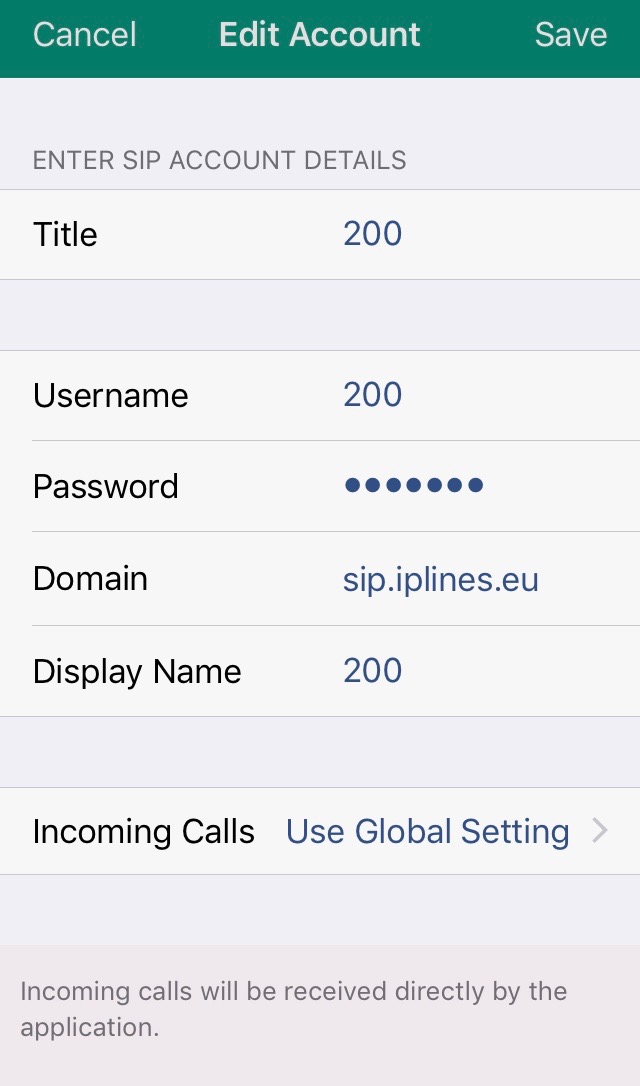
Install Acrobits Softphone, go to Settings → SIP Accounts, press + and choose Generic SIP Account. Fill in title, username, password, domain sip.iplines.eu:5060 and display name, press Save — done.
Install iSoftphone from the App Store, open Preferences → My SIP Accounts, press +, fill in description, username, password and server address sip.iplines.eu, press OK. Telephone, Linphone and Zoiper work the same way.
Both free. In X-Lite open File → Account Settings and enter account name, user ID, domain sip.iplines.eu:5060, password and display name. MicroSIP is the lighter option on older machines. Screen-by-screen shots are in the softphone section of the main page.
Any SIP desk phone registers the same way: Cisco SPA, Yealink, Grandstream, Fanvil, Snom. Tell us the model and we send the exact settings, or pre-configure the phone before it ships.
Usually the firewall. Call us and we look at the switch log with you.
UDP by default; TLS with SRTP where we enabled it on your account.
Yes — register the softphone and a desk phone in parallel.